




New in Payminator: New Features and Improvements
Practical updates that make it easier to work with requests, documents, reports, and employee data reviews.
We continuously improve Payminator to best reflect what payroll and HR teams deal with in their everyday work.
Take a look at what we have recently updated in the application and what new options Payminator now offers.
01. Payroll accountants can edit submitted requests
Payroll accountants can now edit employees' submitted requests directly. If, during a review, they find that a piece of information needs to be corrected, an amount changed, or a document added, there is no longer any need to return the request to the employee for completion.
Simply use the “Edit submitted request” button. The payroll accountant can access the latest version of the form and edit the required information and amounts, upload a new document, or attach a document that the employee previously uploaded to the Documents section.
Once the edits are complete, the payroll accountant returns to the specific request, where they can see the updated information and approve and complete the request as usual.
The edit is also recorded in the application. The request shows who edited it and when. The employee will also see the form marked as “Approved with payroll accountant’s changes.”

Important
Editing the request does not change the original date when the employee submitted the request or the dates stated on the official form.
The payroll accountant also cannot edit the employee questionnaire.
02. Four-eyes review
For companies that want to involve a second review when processing requests, we have added the option to set up a four-eyes review in Payminator.
Each request therefore goes through a review by two payroll accountants before it is finally approved or rejected.
The first payroll accountant reviews the request and proposes approval or rejection. The application records who performed the review and when. The second payroll accountant then reviews the request and can either confirm or change the original proposal. This creates the final status of the request.
If the first and second reviews differ, the request history retains an overview of both steps, including information about who made each decision and when.

03. New filtering and sorting options
Working with a larger number of requests is now easier thanks to expanded filtering and sorting options.
In the Requests section, you can now set multiple filters depending on what you need to find. For example, you can select:
- year
- request type
- cost center
- sorting method
Do you need to display only 2025 RZD requests for a specific cost center and sort them from newest to oldest? Simply combine the individual criteria.
We have also expanded cost center filtering to the Employees, Messages, and Reports sections.
You can select one or more cost centers, and your selection remains when moving between different parts of the application.
04. “Checked” indicator for documents
In Monthly Rebates (Taxpayer Declaration) and Annual Tax Settlement requests, you will now find a “Checked” indicator next to uploaded documents.
If a document has already been approved by a payroll accountant, this information is displayed directly next to the document, together with the date it was uploaded.
This gives you an immediate overview of documents that have already been checked, so there is no need to verify them repeatedly.

05. New reports and JMHZ enhancements
In response to the requirements of the Unified Monthly Employer Reporting (JMHZ), we have expanded the application with new data and reports that make it easier to collect the required information and prepare the necessary materials.
One of the new features is expanded employee tax residency information. If an employee indicates that they are not a tax resident of the Czech Republic, they will now also enter their address in their country of tax residence (street, city, and postal code). This means that you will have all the required information prepared directly in the application.
New reports are also now available:
- Unified Monthly Employer Reporting: provides an overview of all data from submitted Annual Tax Settlement and taxpayer declaration requests.
- Children (JMHZ): displays information about all dependent children of the employee. It also includes a separate sheet with information about the second caregiver.

06. Even more comprehensive reports
We have also expanded some existing reports with additional useful information, giving you a better overview of the processing of individual requests.
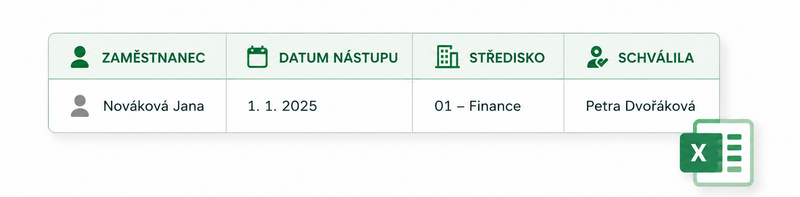
The “Employees whose ATR will be processed” and “Employees claiming monthly rebates from the employer” reports now also include information about the user who approved the latest version of the form.
The reports also now include the employee's cost center, making it easier to filter the data and work with larger amounts of information.
Your Payminator Team